Analyze thousands of YouTube comments without reading every threadFind the signal fast
CommentOwl turns messy comment sections into organized audience intelligence: sentiment, repeated questions, viewer requests, confusion points, praise, complaints, trends, and content opportunities. Use it when a video gets more feedback than you can manually process.
See what viewers are asking, requesting, praising, complaining about, and discussing most, then use those signals to plan clearer replies and stronger follow-up content.
What a YouTube comment analyzer should actually tell you
A busy YouTube comment section is useful, but it is also noisy. The first few comments may show enthusiasm, the pinned comment may steer the conversation, and the newest comments may be reacting to a recent trend. Reading everything manually works for small channels, but it breaks down once a video has hundreds or thousands of replies. A real YouTube comment analyzer should help you understand the audience conversation as a whole, then point you toward the comments that deserve action.
CommentOwl is designed for that workflow. Instead of treating comments as a flat list, it organizes viewer feedback into creator-friendly sections. You can see a video overview, audience signals, viewer questions, viewer requests, confusion signals, content opportunities, praise, complaints, improvement opportunities, trending topics, and engagement opportunities. That combination helps you move from raw comments to decisions: what to reply to, what to fix, what to explain, and what to create next.
The goal is not to replace your judgment. The goal is to remove the repetitive scanning work so your judgment is applied to the right patterns. If viewers are repeatedly asking about pricing, setup, ingredients, links, templates, timestamps, alternatives, or next steps, you should not have to discover that by scrolling for an hour. If viewers are confused by the same section of a tutorial, that should be visible quickly. If a joke, product point, or visual detail is getting praise, that should become part of your content strategy.
What CommentOwl surfaces
CommentOwl focuses on the kinds of insights creators can use immediately after publishing or while planning follow-up content.
Video overview
Start with a concise summary of how viewers responded to the video. The overview highlights broad audience reaction, recurring feedback, and the main themes driving the conversation.
Audience signals
Understand what viewers care about, where they are engaged, and which topics appear repeatedly across the comment section. This helps separate one-off opinions from meaningful patterns.
Questions and requests
Pull out viewer questions and content requests so you can answer common points, update descriptions, pin useful replies, or plan your next video around validated demand.
Confusion and complaints
Identify where viewers are stuck, disappointed, or asking for clarity. These signals are useful for improving tutorials, product explanations, offers, and future video structure.
Trends and opportunities
Spot topics that are gaining attention and turn comment threads into follow-up ideas, short-form clips, community posts, livestream topics, or product research notes.
Exportable insights
Share organized findings with editors, clients, sponsors, researchers, or anyone responsible for the next content decision.
How to use CommentOwl as your YouTube comment analyzer
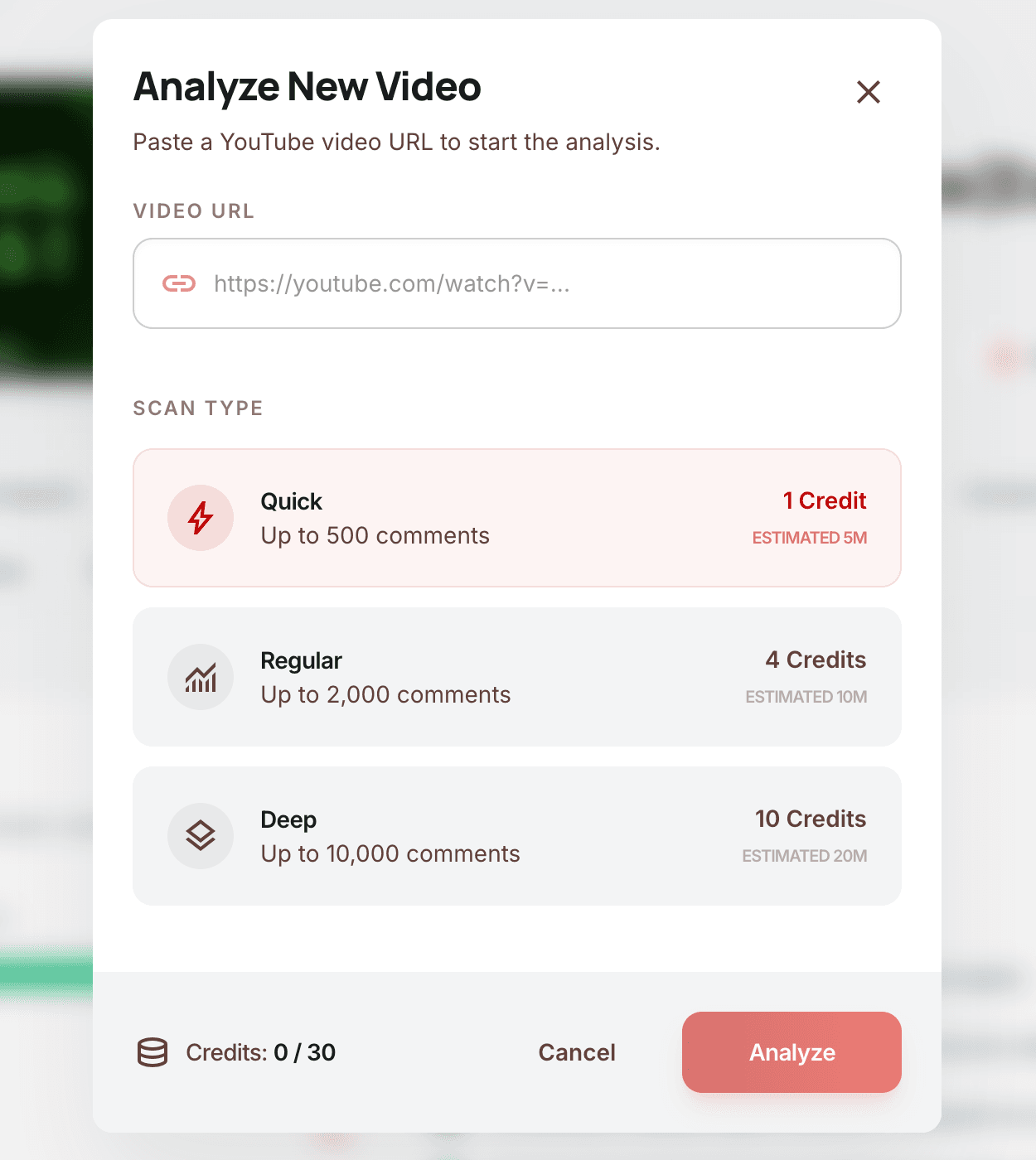
Choose the right scan depth
Use a Quick Scan for smaller reads up to 500 comments, a Regular Scan for deeper analysis up to 2,000 comments, or a Deep Scan for high-volume videos up to 10,000 comments. This keeps analysis cost aligned with the size and importance of the video.
Review the summary before individual comments
Start with the overview and audience signals. This gives you the shape of the conversation before you dive into specific examples, which prevents a few loud comments from distorting your interpretation.
Turn sections into actions
Questions become replies or FAQ updates. Requests become future content ideas. Confusion becomes a chance to improve explanations. Praise becomes proof of what is working. Complaints become issue lists your team can triage.
Export or share the findings
When you need to work with an editor, client, brand partner, or internal team, export the insight set so the conversation is based on audience evidence instead of scattered anecdotes.
Example ways creators use a comment analyzer
Tutorial creator
A tutorial video receives 1,800 comments. CommentOwl surfaces repeated confusion about one setup step, several requests for a beginner version, and praise for a specific visual explanation. The creator pins a clarification, updates the description, and plans a beginner follow-up.
Product review channel
A review attracts comments comparing alternatives. The analyzer groups requests for competitor comparisons, complaints about missing details, and questions about long-term durability. Those findings become the outline for the next review video.
Marketing team
A brand campaign video gathers a mixed response. CommentOwl separates positive language, objections, misunderstood claims, and engagement opportunities, giving the team a cleaner read on audience perception than surface-level engagement metrics.
Questions before you scan
Can CommentOwl analyze large YouTube comment sections?
Yes. CommentOwl can analyze comment sections at different depths, including deep reads for high-volume videos with thousands of comments.
Is this only sentiment analysis?
No. Sentiment is one part of the analysis, but CommentOwl also extracts questions, requests, complaints, praise, confusion signals, trending topics, improvement ideas, and engagement opportunities.
Who should use a YouTube comment analyzer?
Creators, editors, channel managers, marketers, agencies, researchers, and product teams can use it whenever viewer comments contain feedback that should influence decisions.
Can this help me decide what to make next?
Yes. Viewer requests, repeated questions, trending topics, and content opportunities can all point toward follow-up videos your audience already wants.
Ready to turn comments into strategy?
Start with a free scan and see which audience signals are hiding inside your YouTube comments.
Start Your First ScanNo credit card required for free tier